
Common Error Messages
When trying to access the nCino eVault API, you may encounter error messages. This guide will try to explain some of the common ones and what to do about them.
Error 401
This error indicates your token is either invalid or expired. Authentication tokens currently expire after 5 minutes.
To resolve:
- Confirm the token provided matches what was granted to you
- The token must be provided back to the API with each request in the format: "Bearer XXXXXXXXXX" where XXXXXXXXXX is the token you received.
- Best practice would be to request a token at the beginning of each batch of operations.
Error 403
This error has 2 possible error messages:
1. "The client does not have access to the requested resource"
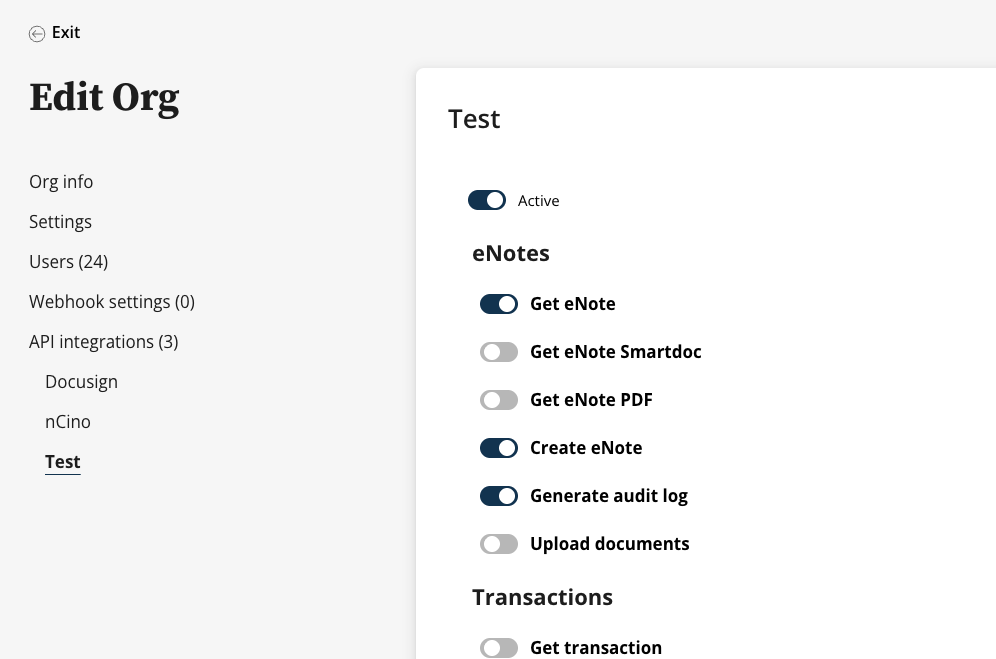
This means that the endpoint is not enabled or the credential hasn't been given permission to access the endpoint. Typically this will mean that the toggle switch for that endpoint has not been enabled.
To Resolve:
- In the Org Settings, click on your integration.
- Ensure the "Active" toggle is turned on.
-
Find the resource you are trying to use and make sure the toggle is enabled.
2. "The client is not authorized to perform this action"
This is a generic message that typically indicates the workflow isn't enabled in other parts of the platform. For example, trying to access an endpoint for functionality which hasn't been enabled in the main configuration of the system.
This may require some assistance from our customer team.
Updated 2 months ago